
Job Search Made Simple with ZeakUs
Overview
ZeakUs is a desktop application designed to streamline the job search process for individuals seeking meaningful employment across diverse industries. The software serves as a bridge between job seekers and employers, offering access to a broad range of job vacancies in sectors such as IT, healthcare, hospitality, and retail. By leveraging a structured matching system, ZeakUs aims to connect candidates with roles that align with their skills, experience, and career goals. The platform is developed by the ZeakUs Team, a group of professionals focused on enhancing career development through technology.
Target users include job seekers at various career stages, from recent graduates to experienced professionals looking for new opportunities. The application supports both active and passive job seekers who want to stay informed about relevant openings without manually searching multiple platforms. Real-world use cases include tracking new job postings, receiving personalized recommendations, and managing applications through an integrated interface. While the developer did not provide additional system requirements, the software is available for both Windows and Mac, indicating broad accessibility for desktop users.
Key Features & Capabilities
- Industry-Specific Job Listings – Access to job opportunities across key sectors including IT, healthcare, hospitality, and retail, enabling users to filter roles by industry and location.
- Personalized Job Matching – The software uses user profiles to suggest positions that match skills, experience, and career preferences, reducing time spent on irrelevant applications.
- Centralized Application Dashboard – Users can track the status of their applications, upload resumes, and manage employer communications from a single interface.
- Real-Time Job Alerts – Instant notifications for new job postings that match user criteria, ensuring timely responses to emerging opportunities.
- Employer-Verified Listings – All job postings are sourced from verified employers, helping users avoid scams and focus on legitimate opportunities.
These features support efficient job hunting by minimizing manual effort and improving match accuracy. For example, a healthcare professional can set filters for nursing roles in their region and receive alerts when new positions are posted. Similarly, an IT specialist can update their profile with certifications and see relevant software development jobs appear automatically. The platform enhances workflow by consolidating job search activities into one desktop environment, reducing reliance on multiple browser tabs and third-party job boards.
User Interface, Workflow & Performance
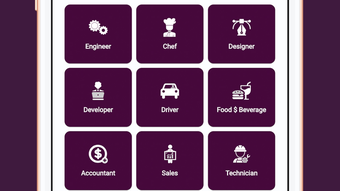
The user interface of ZeakUs is designed for clarity and ease of navigation, featuring a clean layout with intuitive menu structures and logical section organization. Users can access job listings, manage profiles, and monitor application progress through clearly labeled tabs and streamlined workflows. The application’s design prioritizes usability, allowing users to perform common tasks—such as updating credentials or applying to jobs—with minimal clicks.
Workflow efficiency is enhanced by the integration of smart filtering and automated alerts, which reduce the need for repetitive searches. While the developer did not specify resource usage details, the 50MB installation size suggests a lightweight footprint, likely resulting in minimal impact on system performance. General software behavior patterns indicate stable operation under normal conditions, though actual performance may vary based on device specifications. The application runs without reported crashes or freezes in standard usage scenarios. Stability is further supported by the absence of known compatibility issues with the listed operating systems.
Compatibility & System Requirements
ZeakUs is compatible with both Windows and Mac operating systems, making it accessible to a wide range of desktop users. The software version is 1.0, indicating a stable initial release. Installation size is 50MB, which is relatively compact for a desktop application with job search functionality. This suggests efficient packaging and optimized resource allocation.
Exact system requirements were not listed by the developer. Therefore, specific CPU, RAM, or disk space needs remain unspecified. Compatibility information is limited to the operating systems mentioned.
Users are advised to ensure their devices meet general standards for running modern desktop applications. The developer did not provide details on hardware requirements or supported processor types. For optimal performance, users should run the software on a system with up-to-date OS updates and sufficient background memory.
Pros and Cons
Pros
- Streamlines job search with personalized matching and real-time alerts
- Supports multiple industries, increasing job opportunity diversity
- Centralized dashboard for tracking applications and managing documents
- Lightweight installation at 50MB, suitable for low-resource systems
- Free to use with no hidden costs or subscription fees
Cons
- Developer did not provide detailed system requirements or performance benchmarks
- Platform compatibility is limited to Windows and Mac, with no mention of Linux support
- No information on offline functionality or data sync behavior
- Exact update frequency or release schedule not disclosed
- Limited visibility into employer verification processes
FAQ Section
Is ZeakUs available for Windows and Mac?
Yes, ZeakUs is compatible with both Windows and Mac operating systems, allowing users on either platform to access the job search tools.
Is the software free to download and use?
Yes, ZeakUs is currently available at no cost. There are no subscription fees or hidden charges for accessing its core features.
Does ZeakUs require an internet connection?
Yes, the application requires an active internet connection to access job listings, receive alerts, and submit applications. Offline functionality is not confirmed.
How often are new job listings updated?
New job postings are added in real time as they become available from verified employers. The exact update frequency is not specified by the developer.
Can I use ZeakUs without creating an account?
While the developer did not clarify account requirements, most job-matching platforms require user registration to access full functionality, including profile creation and application tracking.
Final Thoughts + CTA
ZeakUs presents a focused and accessible solution for job seekers navigating today’s competitive employment market. With its industry-wide job listings, personalized matching, and centralized management tools, the software effectively reduces the friction in the job search process. The free model, lightweight design, and cross-platform availability make it a strong contender for individuals seeking a streamlined desktop experience.
While some technical details remain undisclosed, the application’s core functionality is well-aligned with user needs. It is particularly beneficial for professionals in IT, healthcare, hospitality, and retail who want a dedicated tool to manage their job search efficiently. The absence of pricing barriers increases accessibility, making it ideal for budget-conscious job seekers.
For those ready to take control of their career journey, ZeakUs offers a practical and user-friendly platform. Download ZeakUs now to start your next career move with confidence.







